Last updated: July 8, 2026
A custom WordPress website typically costs $15,000 to $120,000+ in 2025, depending on design complexity, integrations, content, and accessibility scope. The honest answer to “how much?” is a range, not a single number—but a range you can plan around once you know what drives it.
If you’ve ever asked, “How much does a custom WordPress website cost?” you’ve likely received the common but frustrating reply: “It depends.” While accurate, that answer doesn’t give you the strategic clarity you need to confidently budget your next web initiative. At 3 Media Web, we believe transparency around pricing empowers you to make informed, goal-driven decisions.
This guide is written for senior marketing leaders—the VPs and directors focused on revenue, ROI, and aligning digital initiatives with business objectives. By the end, you’ll understand the real costs—and the real value—of a custom WordPress website, no matter how you’re searching for pricing.
You can explore this further in Migrate from Ektron to WordPress: A Marketing Team’s Guide.
TL;DR: What a Custom WordPress Website Costs in 2025
- Typical range: $15K–$30K (Starter), $30K–$60K (Growth), $60K–$120K+ (Enterprise).
- Biggest cost drivers: custom theme development, information architecture, third-party integrations, performance, and accessibility.
- Timeline: most custom builds take 3–6 months; a phased MVP launch can ship faster.
- Ongoing budget: plan 10–20% of the initial investment annually for hosting, maintenance, and optimization.
What Will You Learn in This Guide?
This guide breaks down everything that shapes the price of a custom WordPress build so you can budget with confidence. You’ll come away knowing the cost drivers, realistic ranges, and the hidden line items most quotes leave out.
- Key factors that drive website pricing
- Realistic price and budget ranges by project size
- Hidden costs to prepare for
- How to reduce costs through client collaboration
- Real-world results and examples
What Is a Custom WordPress Website (and How Is It Different from a Template)?
A custom WordPress website is a site built on a purpose-made theme and content structure designed around your brand, content, and goals—rather than a pre-packaged template you adapt to. A template starts with a fixed design and asks you to fit your content into it; a custom build starts with your content and business objectives and shapes the design, code, and CMS around them. That difference is the single biggest reason quotes vary so widely.
You can explore this further in Custom Website Design vs. Templates: Which Should You Choose?
What Factors Impact Custom WordPress Website Pricing?
Eight factors account for most of the variation in a custom WordPress quote: theme approach, information architecture, page types, integrations, performance, accessibility, QA, and timeline. The more each one is tailored to your goals, the more the investment shifts from the lower tier toward the upper tier.
1. Custom Theme Development vs. Off-the-Shelf Themes
Off-the-shelf WordPress themes launch quickly but carry bloated code, slower performance, and limited flexibility. That bloat degrades user experience, hurts SEO, and often forces a costly rebuild within a year or two—which is exactly the rework a custom theme is designed to avoid.
Custom themes are:
- Lightweight and performance-optimized
- Built to match your design and content strategy
- Scalable and easy to maintain
Tip: Investing in a custom theme early saves on future redevelopment and reduces ongoing support costs.
2. Information Architecture (IA)
Information architecture is the structural map that helps users—and search engines—find what they need, and weak IA is one of the most common reasons a site underperforms. Clear, logical structures improve UX and strengthen SEO at the same time. Both the Nielsen Norman Group and Google treat IA as foundational to a successful digital experience.
At 3 Media Web, we:
- Conduct in-depth IA and content audits
- Map content to user intent and business goals
- Build scalable sitemap structures that evolve with your business
Industry insight: In biotech and healthcare, IA is vital for guiding users to complex content like clinical trials, patient resources, and compliance documentation. We cover this in depth in our look at B2B website expectations in biotech.
Takeaway: A clear IA helps users navigate faster, supports SEO, and improves lead flow—especially in regulated industries with complex offerings.
3. Custom Pages vs. Custom Post Types (CPTs)
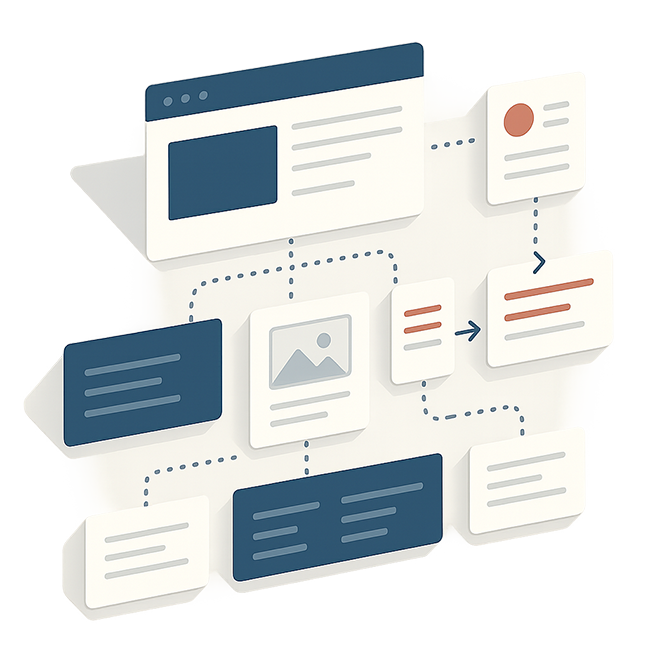
Custom pages are unique one-off layouts, while custom post types are reusable templates built once and used many times. Understanding the difference helps you budget and plan, because CPTs trade upfront strategy for major savings at scale.
- Custom Pages: Unique layouts for core pages like Home, About, and Services. These require more design and development time.
- Custom Post Types (CPTs): Reusable templates for blogs, case studies, events, or products. Built once, used many times.
In our work with SENKO, a global fiber optic manufacturer, we rebuilt a static HTML site into a WordPress CMS and used reusable templates to manage a catalog of 200+ searchable, filterable products—complete with a custom 3D product configurator. In the year-over-year comparison after launch, time on site nearly doubled, pages per visit rose about 50%, and bounce rate dropped more than 20%. That’s the payoff of structuring product content once and reusing it well, instead of hand-building every page.
Tip:
- Plan CPTs early so developers can build reusable blocks.
- Define which content types should be structured this way.
Takeaway: CPTs offer big savings at scale, but they require upfront strategy and smart development.
4. Third-Party Integrations
Most modern websites must sync with tools like CRMs, marketing automation, HR systems, or compliance platforms, and each connection adds to scope, timeline, and price. Software integrations add functionality and value—but they also add development and QA hours.
CRM & Marketing Automation
Platforms like HubSpot or Salesforce let lead capture, analytics, and campaign workflows run seamlessly.
Industry insight: Software companies rely on HubSpot to streamline demo requests, automate follow-up, and track pipeline velocity.
Careers & HR
Applicant tracking and HR systems sync job listings and applications to your site, and each connection adds scope, timeline, and QA hours to a build.
Industry insight: Nonprofits use job integrations to manage staff hiring and volunteer signups across regions.
Legal & Compliance
GDPR and CCPA tools like Cookiebot help manage consent and compliance.
Tip:
- List every platform that needs to connect to your site.
- Host a pre-kickoff planning session to prioritize integrations.
Takeaway: More integrations mean more value—but also more development and QA. Early planning keeps costs predictable.
5. Performance Optimization (Core Web Vitals)
According to Google Search Central, Core Web Vitals are used by Google’s ranking systems, so site speed directly affects both SEO and conversion rates. A slow, clunky site frustrates users, increases bounce rates, and erodes trust—ultimately costing leads, engagement, and revenue.
We address performance through:
- Clean code and optimized images
- Hosting and CDN configuration
- Mobile responsiveness and script control
Tip:
- Avoid overusing large hero images or sliders, especially above the fold. These elements can look appealing but often degrade load speed and dilute conversion focus.
- Use properly sized, compressed images and consider asynchronous loading for non-critical scripts to prioritize speed.
Industry insight: Financial services firms demand speed—page-load delays can cost leads, erode trust, and reduce conversions.
Takeaway: Investing in performance pays off with faster load times, better UX, and stronger SEO.
6. Accessibility & Compliance
Accessible websites reach more users and reduce legal risk, and the audience is enormous: according to the World Health Organization (WHO), at least 2.2 billion people have a near or distance vision impairment. ADA-related digital lawsuits also continue to rise, making website accessibility both a compliance issue and a growth opportunity.
Beyond compliance, accessibility meaningfully broadens your potential audience. By building to WCAG standards, you’re not only meeting legal requirements—you’re opening your site to millions of users who might otherwise be excluded.
Industry insight: Many grants and funding sources now require proof of digital accessibility, so for nonprofits and NGOs a WCAG-compliant site can directly influence eligibility for critical funding.
Tip:
- Budget for accessibility audits if you’re in a regulated or publicly funded space.
- Work with specialists early to build accessibility in—not bolt it on later.
Takeaway: Accessibility isn’t just a legal checkbox—it’s a growth and trust builder that helps you reach and convert a wider audience.
7. Quality Assurance (QA)
Quality assurance verifies that your site works reliably across modern devices and browsers before launch, protecting brand credibility and minimizing post-launch fixes. Thorough QA gives every visitor a consistent experience, whether they’re on desktop, mobile, or tablet.
Meticulous QA covers:
- Device compatibility (desktop, tablet, mobile)
- Cross-browser testing (Chrome, Firefox, Safari, Edge)
- Functional checks (forms, interactions, dynamic content)
Tip:
- Define your device and browser test matrix during planning so all stakeholders agree on QA scope.
- Assign an internal stakeholder to preview critical pages early and catch inconsistencies before launch.
Takeaway: Thorough QA ensures smooth launches, reduces the risk of unexpected bugs, and builds trust with users and internal stakeholders alike.
8. Timelines & Phased Rollouts
Custom sites typically take 3–6 months, depending on scope, integrations, design customization, and stakeholder involvement. When timelines are tight or event-driven, a phased launch lets you ship sooner:
- Phase 1 (MVP): 1–5 pages with critical content and basic functionality
- Phase 2: Expanded content, integrations, and features
This gives your team something to launch fast while still allowing for scalability and strategy.
What Is the Price of a Custom WordPress Website by Tier?
Custom WordPress websites generally fall into three budget tiers: Starter ($15K–$30K), Growth ($30K–$60K), and Enterprise ($60K–$120K+). The right tier depends on complexity, integrations, and content strategy. The table below outlines what each level typically includes.
| Tier | Budget Range | Best For | What’s Included |
|---|---|---|---|
| Starter | $15K–$30K | Smaller sites and focused launches | Semi-custom build, 5–10 pages, basic integrations |
| Growth | $30K–$60K | Scaling B2B marketing teams | Custom theme, multiple CPTs, SEO/UX, CMS training |
| Enterprise | $60K–$120K+ | Complex, regulated, or high-traffic organizations | Advanced IA, integrations, accessibility, QA, custom workflows |
When Should You Invest in a Custom WordPress Site Instead of a Template?
Choose a custom build when your site has to do real work: multiple integrations, complex content types, regulated or accessibility requirements, or a brand that a template can’t credibly carry. A quick test—if you need more than a handful of unique page layouts, plan to scale content over time, or rely on the site for lead generation, custom pays back. If you need a simple brochure site fast and cheap, a well-chosen template is the smarter call.
What Hidden Costs Should You Anticipate?
The most overlooked website costs are content creation, software licensing, hosting upgrades, and post-launch support—expenses that often surface mid-project or after go-live. Planning for them upfront reduces surprises and keeps your project aligned with expectations.
- Content creation and revision
- Licensing for integrations and tools
- Hosting upgrades, CDNs, and SSL
- Post-launch enhancements or support
How Do You Estimate a Custom WordPress Website Cost?
Estimate the cost by scoping four variables in order: page and template count, number and complexity of integrations, performance and accessibility requirements, and content volume. Map each to a tier (Starter, Growth, or Enterprise), then add 10–20% of the build cost as an annual budget for hosting, maintenance, and optimization. This framework turns a vague “it depends” into a defensible number you can bring to your leadership team.
How Can Clients Help Manage Costs?
Clients keep costs down most effectively by providing assets early, securing stakeholder buy-in, and giving timely feedback. The smoother your inputs, the fewer billable hours spent on rework and waiting.
- Provide assets early: Logos, brand guides, content, and images.
- Get stakeholder buy-in: Avoid costly mid-project pivots.
- Own content entry: Entering your own blog posts or bios can save hours.
- Give timely feedback: Keeps the project moving and avoids rework.
- Support QA: Flag issues early and internally where possible.
A dependable agency partner makes this collaboration easier. For a closer look at what that relationship should feel like, read what to expect from a website support partner.
Frequently Asked Questions
Why not just use a pre-built theme?
Off-the-shelf themes often carry bloated code, limited customization, and performance issues. Those drawbacks raise long-term costs for maintenance, rework, and missed SEO opportunities. A custom theme is purpose-built for your goals—cleaner code, better performance, and real flexibility.
Is WordPress secure enough for enterprise?
Yes. WordPress is secure when maintained properly. With secure hosting (such as WP Engine or Pantheon), regular updates, user-role management, and security plugins, WordPress powers many Fortune 500 sites. Security is about implementation, not platform limitations.
For more on this topic, read WordPress vs. Wix for B2B: Which Platform Wins?
How often should we redesign our website?
On average, every 2.5–3 years—but more importantly, your site should evolve alongside your business. If you’re rebranding, launching new services, or entering new markets, your site should reflect that. A well-structured custom site supports module-level updates instead of full rebuilds.
What should we budget for annual website maintenance?
For mid-size to enterprise B2B organizations, plan to budget 10–20% of your initial site investment annually for hosting, maintenance, and support—covering updates, security patches, analytics, content optimization, and performance tuning.
What’s the difference between hiring a freelancer and a web agency?
A freelancer may offer lower upfront costs but often lacks strategic insight, QA rigor, and cross-disciplinary skills. A full-service agency brings strategy, design, development, testing, and long-term support under one roof, reducing risk and accelerating delivery.
What is the cheapest way to build a custom WordPress site?
The most cost-effective route is a phased build that launches an MVP of 1–5 essential pages first, then expands. Pair that with owning your own content entry and providing assets early, and you control the largest variable line items without sacrificing a custom foundation.
Final Thoughts: Your Website as a Growth Asset
A custom WordPress website is more than a digital brochure—it’s your most important sales platform, trust builder, and conversion engine. Unlike template-driven or fragmented experiences, a custom build aligns your brand, messaging, and functionality in a scalable, strategic way.
When done right, your website becomes the centerpiece of your marketing strategy. It supports every stage of the buyer journey—from first impression to conversion to ongoing engagement—and a performant, accessible, SEO-optimized site delivers compounding returns across marketing, sales, and operations.
Aligning your website strategy with a clear, phased, and realistic budget is what transforms a tactical web build into a revenue-driving asset. At 3 Media Web, we partner with growth-minded companies to deliver high-performing sites that evolve at the pace of your business.
For how these numbers get pinned down project by project, see how to scope a WordPress development project.
Platform moves carry their own line items — our Drupal-to-WordPress migration guide shows where the budget actually goes.