Last updated: July 1, 2026
- A design toolkit is a library of reusable horizontal sections (we call them “bands”) that you assemble like building blocks to create pages without a designer at every step.
- A page layout is the blueprint that decides which bands go where, so a page guides the visitor and supports a clear goal.
- The toolkit gives you the pieces; the layout tells you how to arrange them. You need both to build cohesive pages fast.
- This is 3 Media Web’s version of a design system: the same reusable components and patterns that let teams replicate designs quickly and keep every page on-brand.
- For a B2B marketing team, the payoff is real control: launch and update pages yourself while the design stays consistent.
What is the difference between a design toolkit and a page layout?
A design toolkit is the set of reusable building blocks; a page layout is the plan for arranging them. The toolkit answers “what pieces can I use?” and the layout answers “where does each piece go and why?” Great web design is not a choice between the two. It comes from using a flexible toolkit inside an intentional layout, so pages are fast to build and still purpose-built for the visitor.
Have you ever wondered what actually makes a website easy to grow after launch? At 3 Media Web, the answer is the pairing of a design toolkit and page layout designs. The toolkit gives us the pieces to work with, and the layout shows us how those pieces fit together. This is our applied version of a design system. According to the Nielsen Norman Group, a design system is a complete set of standards for managing design at scale using reusable components and patterns. Below, we break down both terms, why they matter, and how they work together on a real custom web design project.
What is a design toolkit?
A design toolkit is a collection of horizontal components (we call them bands) that you reuse like puzzle pieces to build pages. Each band is a pre-designed, pre-formatted section, so creating a page becomes a matter of choosing the right bands, swapping in your content, and publishing, rather than designing every section from scratch.
When you open the back end of your website, you can browse a list of every band available in your site’s design, then pick and choose what fits the page you are building.
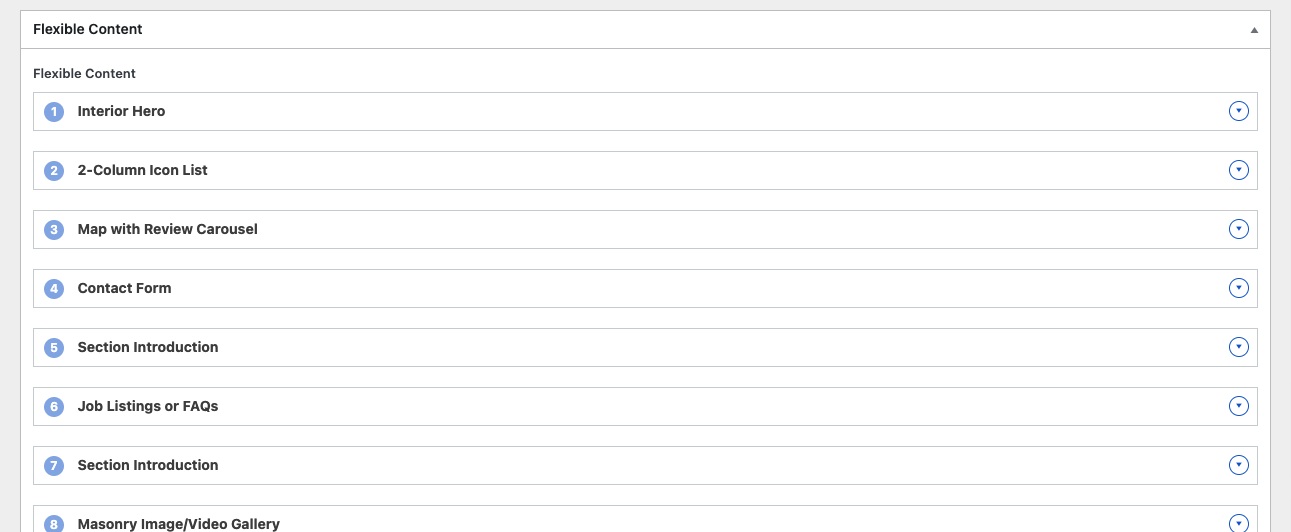
Selecting a component drops a well-designed, pre-formatted band onto your page. After you update the copy and swap in the right photo, you can publish and move on to the next page without booking a designer for every change.
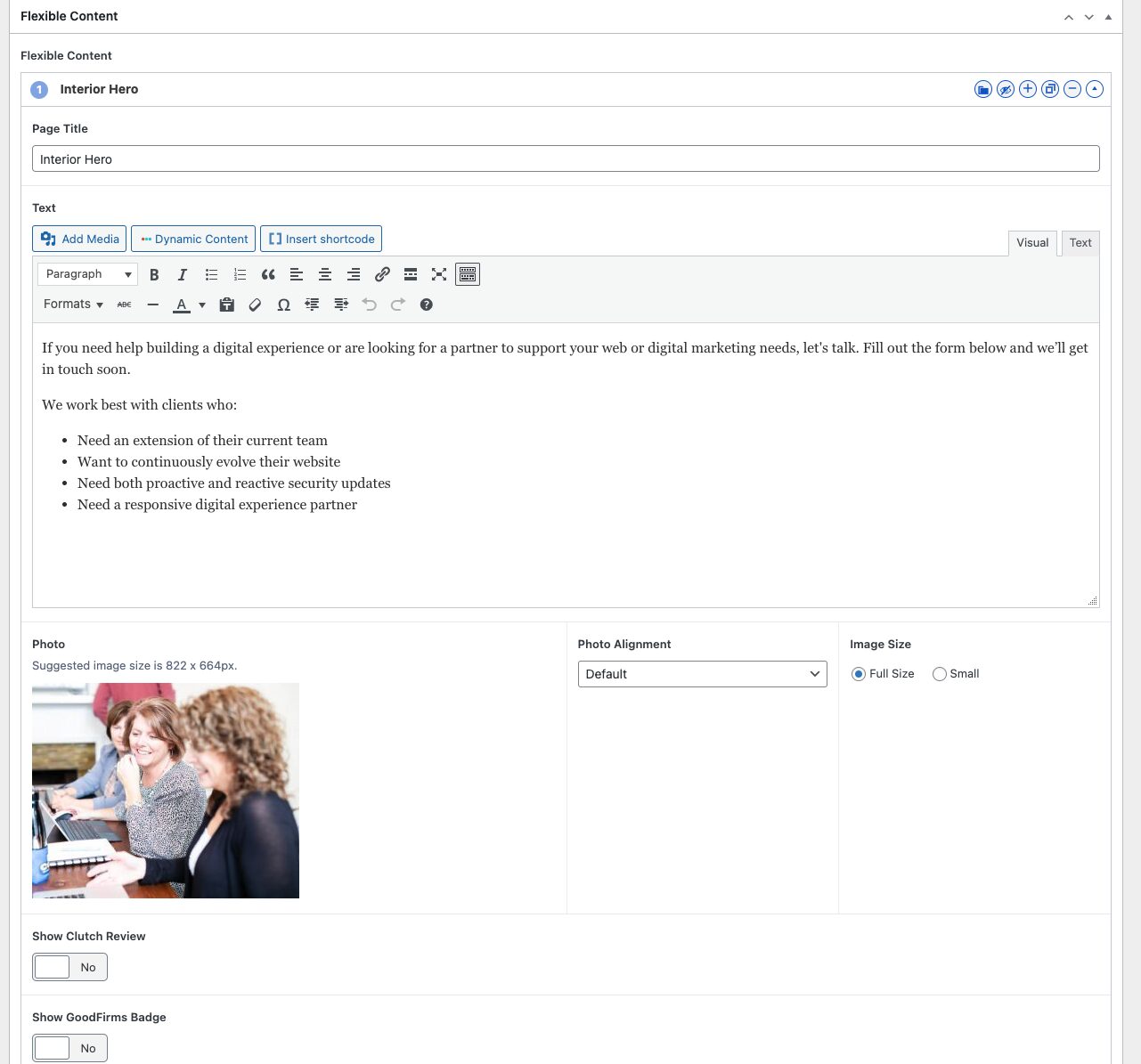
What is a band in web design?
A band is a single, full-width horizontal section of a page, such as a hero, a feature grid, a testimonial, or a call to action. In a design toolkit, each band is pre-designed and reusable, so you build a page by stacking bands in the order you want rather than coding sections one at a time. Bands are the component layer of the design system.
Here is why this approach pays off for a marketing team that needs to move quickly.
It saves time and keeps pages consistent
Reusable bands make design and development faster because no one starts from a blank page. Developers and content owners mix and match existing bands to build pages, and because every band follows the same design rules, the finished pages look like they belong together. This is the exact benefit the Nielsen Norman Group attributes to design systems: reusing premade components replicates designs quickly while reducing the risk of unintended inconsistency.
It is easy to adjust and grow
Each band works on its own or inside a larger design, which makes it simple to update an existing page or spin up a new one. Want every interior page to share the same call-to-action section? Build the band once, then add it wherever you need it, the same way we did across the 3 Media Web site.
It gives your team more control
Once your site is live, the toolkit lets your team create new pages from the pre-designed bands while staying inside the established design style. Adding an interactive element is just as simple. Dropping in an accordion, for example, can be as easy as reusing an existing band rather than commissioning new design work. That day-to-day control is also what makes a site easier to support and maintain with a partner over time.
In our work with Cedar Gate Technologies, a healthcare data SaaS company, we built a custom band system with per-band style controls so their marketing team could update layouts and content without opening support tickets or waiting on developers. That change saved them more than 40 hours a month on internal updates, and the project came in under budget at 83% of the original forecast. It is a concrete example of what a well-built toolkit does once the site is live: the pieces are ready, so the team ships.
What is a page layout?
A page layout is the plan that organizes how components fit together into a complete, functional page. If the toolkit is the box of parts, the layout is the instruction sheet: it decides the order of the bands, what gets emphasized, and how a visitor should move down the page. Here is why layouts matter as much as the parts themselves.
It improves the user experience
A strong layout guides people through the page smoothly so they find what they need without friction. The sequence of sections is what turns a pile of good components into a journey the visitor can actually follow.
It focuses attention
Layouts decide what stands out, whether that is a primary button, a headline, or a hero image. Deliberate placement is how you direct the eye toward the action you want a visitor to take.
It keeps branding strong
Using consistent grids and templates makes sure every page reads as part of the same brand. Layout discipline is what keeps a fast-growing site from drifting into a patchwork of one-off pages.
It aligns the team on key pages
For high-stakes, high-conversion pages, a full page layout keeps the designer and the stakeholder on the same page about how the content should be represented before any building begins. Layouts are the structure that turns the toolkit’s bands into a complete and effective design.
Why combine a design toolkit and page layouts?
Pairing a toolkit with layouts is what makes scalable web design possible, because each one covers the other’s blind spot. The toolkit gives you near-endless options, and the layout makes sure those options serve the user and the business goal. Here is how the two reinforce each other.
Purpose-driven design
The toolkit supplies flexibility, but the layout ensures the result actually works for visitors and meets a business objective. Options without a plan create clutter; a plan without options creates rigidity.
Freedom within structure
A layout is a guide, not a cage. It leaves room to experiment with different bands inside a proven framework, so each page can feel distinct while staying on-brand.
Teamwork and scale
When everyone understands how the toolkit and the layouts work, collaboration gets easier and the site is far simpler to scale later. This shared language is one of the core reasons design systems exist, and it is part of what B2B buyers should expect from a modern B2B website.
When should you use a page layout instead of just the toolkit?
Use the toolkit on its own for standard, repeatable pages your team builds often, such as resource posts, team bios, or service overviews, where speed matters more than a custom journey. Add a full page layout when the page is high-stakes or conversion-critical, such as a homepage, campaign landing page, or product launch, and the order and emphasis of sections need to be deliberate before anyone starts building.
Design toolkit vs. page layout: a side-by-side comparison
The two are partners, not competitors, but they answer different questions. Use this comparison to see where each one fits and why you need both on a single page.
| Attribute | Design toolkit (the bands) | Page layout (the blueprint) |
|---|---|---|
| What it is | A library of reusable, pre-designed page sections. | A plan for which sections appear and in what order. |
| Question it answers | “What pieces can I build with?” | “Where does each piece go, and why?” |
| Primary job | Speed and consistency when building pages. | User experience, focus, and conversion flow. |
| Best for | Standard pages your team builds and updates often. | High-stakes pages where the journey must be deliberate. |
| Who uses it day to day | Marketers and content owners assembling pages. | Designers and stakeholders aligning on key pages. |
| Design-system equivalent | Component library (reusable UI elements). | Pattern library (reusable layouts and templates). |
The takeaway: the toolkit makes pages fast to build, and the layout makes them worth building. Together they are the foundation of a site your team can confidently own.
Page layouts unlock flexible, scalable B2B web design
Great design is not about choosing between a toolkit and a layout; it is about using both to create pages that are easy to manage, visually consistent, and effective at their job. The toolkit gives you the pieces, the layout shows you how to assemble them, and a thoughtful pairing of the two is what lets a B2B website grow without losing its polish.
So the next time you plan a page, think about how your toolkit and your layout can work together. That partnership is exactly how we approach building and designing websites at 3 Media Web, and it is how the best designs come to life.
Frequently asked questions
What is a design toolkit in web design?
A design toolkit is a library of reusable, pre-designed page sections, which 3 Media Web calls bands. You assemble pages by choosing the right bands, updating the content, and publishing, instead of designing every section from scratch. It is the component layer of a design system that keeps pages consistent and fast to build.
What is the difference between a page layout and a page template?
A page layout is the plan for how sections are arranged on a specific page to guide the visitor and support a goal. A template is a reusable version of that arrangement applied across many pages. The layout defines the intent; the template makes that intent repeatable so every similar page stays consistent.
Do I still need a designer if my site has a design toolkit?
For everyday pages, no. A well-built toolkit lets your marketing team create and update pages on their own while staying on-brand. You bring in a designer for high-stakes pages, new band types, or a refreshed layout, so design expertise is focused where it adds the most value rather than spent on routine updates.
How is a design toolkit related to a design system?
A design toolkit is the practical, client-facing piece of a design system. The Nielsen Norman Group defines a design system as standards for managing design at scale using reusable components and patterns. The toolkit holds the reusable components (bands), and page layouts act as the reusable patterns that arrange them.
How long does it take to build a page with a design toolkit?
Once the toolkit exists, a straightforward page can go from blank to published in an hour or less, because you are assembling pre-designed bands and swapping in copy and images rather than designing from scratch. Complex or high-conversion pages take longer, since they usually start from a deliberate page layout before the bands go in.
Can a design toolkit hurt SEO?
No. A well-built toolkit helps SEO by keeping page structure, headings, and markup consistent across the site, which makes content easier to crawl and maintain. What matters for rankings is the quality of the content and the intent behind each layout, not whether the sections came from a reusable band library.
How 3 Media Web can help
A website your team can actually run is the whole point. At 3 Media Web, we build every site on a design toolkit and clear page layouts so your marketing team can launch and update pages without a designer in the loop for every change, while the design stays consistent and on-brand. That approach powers our custom web design work and the broader way we build websites, guided by our Human and AI approach so judgment leads and the tooling supports it.
Ready for a website you can grow on your own terms? Reach out to our team to see how a toolkit-and-layout approach would work for your site.